Since I started my Personal Video Blog back in November, I’ve had tons of questions about my video editing hardware and video editing software – and about video editing in general.
I am no Pro, and had very little experience when I started, but I do get a lot of compliments on my editing…
Which I personally think is a hack job half the time. LOL.
I often joke that I’m a technophobe, but the truth is I don’t have time OR patience to learn complicated software or hardware. If it’s not quick & easy, I’m probably not doing it. Which is why I chose the video editing hardware I did.
So let’s dig in and I’ll show you exactly what I use, and (in my opinion) the best video editing software…
Video Editing Software
As you can see in the video above, I am using iMovie on a 13.3″ Macbook Pro.
It is the EASIEST video editing software I have ever used in my life! I tried other programs in the past, Camtasia etc, but nothing compares to the simplicity of iMovie. Even for a total newbie.
I’m still running PC’s in my home office, but got the Macbook specifically for mobile video editing. That was the best decision I could have ever made!
Video Editing Hardware
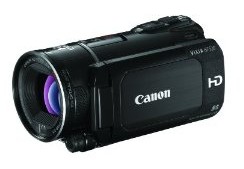
The camera I am using is a Canon Vixia HD Video Camera w/Remote. I chose this make & model after HOURS of research. It has good battery life, and best of all – it works beautifully in AUTO mode. Which is great for people like me that don’t have a clue what all those buttons & features are, and don’t have time to read through the manual.
It has a flat bottom, which is great for setting up anywhere, and it has a flip-out touch screen too. The flip-out screen was a must for me as I do a lot of self-video, and it’s impossible to frame yourself correctly in a video if you can’t see the screen!
This was the thing that drove me mad about the popular Flip Video cams. Handy as they were, it’s hard to believe they were called that when they don’t DO that…
It also comes with a remote, which is GREAT. Especially if I want to be further away from the camera with an external mic. You can use the remote to zoom in and out too, in addition to stop/start. Very nice!
I’ve been told the Canon Vixia is a pain with PC’s, but I have never tried it. With the Macbook it just plugs in, imports, is ready to edit, and you can upload straight to YouTube from there!
Video Camera Accessories
Here’s a quick list of my accessories, all of which I LOVE:
Everything is very mobile, and it all fits right in my camera bag – except the tripod, which has it’s own carrying case w/shoulder strap. The extended life battery pack is a MUST in my opinion, by the way. It gives me well over two hours of shoot time, and it means I always have a spare charged battery in the bag. It comes with it’s own wall charger as well, which works with both batteries.
The external mic has a super long cable, and is “plug & play”. No special settings or buttons required! I simply plug it in, clip it on, and go.
I haven’t gotten into green screens or anything advanced, simply because I’m not doing pro-level productions. I’m mainly doing fun personal videos for my blog at LynnTerry.TV such as this one, which happens to be about coming up with blog content & video topic ideas:
Here is the rest of my Home Office.
That’s where all the magic happens.
If you don’t have a Mac, and don’t plan to get one, you should definitely check out this extremely cheap ($37) step-by-step course by Oliver Olsen. He walks you through free PC software options & all the ins and outs of producing high quality marketing videos. See Video Marketing Problem: Solved!-Highly Recommended
I hope that answers some of your questions about my video editing software & hardware, how I do the cool transitions & scenes, etc. Of course, if you have feedback or questions… I’m all ears! Just leave a comment below.


 Which is why I chose the video editing hardware I did.
  .
.