 I used to keep all of my business notes and task lists on paper. I outlined my first business plan on a legal pad back in 1996, and just continued brainstorming and planning on paper from that point forward.
But this year I've made a huge change in how I organize my notes, and how I structure my Task Lists.
Yes - I finally went digital.  LOL.
LOL.
This was NOT an easy transition. Old habits are hard to break! But it simply wasn't working for me, and I was set on finding a better solution to manage my tasks.
This whole transition started when I was cleaning and organizing my home office, and found old task lists and notes/ideas dating all the way back to 2008. In my office. Not filed, or in my office storage room. IN my office.
It's bad enough they were still lying around cluttering up my work space. But the real eye-opener was in looking over them, and realizing the majority of the tasks never got completed - and the ideas were still just... ideas. I love notebooks & legal pads and writing out my ideas and lists. But I had to face it: it just wasn't working for me.
Enter => Evernote
I've been using Evernote for awhile now, but until recently it was just as much a mess as my paper notes. Adding this, editing that, but no real structure or solid plan.
I need something SIMPLE, which is why paper worked well for me - and why Evernote also works very well for me. Much better actually, as you'll see.
Complex systems and programs just overwhelm me, which stalls my productivity.
Why Did I Choose Evernote To Manage My Task Lists?
As I mentioned in my post on why I love Evernote, it syncs across multiple computers and devices. It's cross compatible and so I have it installed on my Droid Razr, Macbook Pro, Apple iPad, and both of my PC computers.
The problem with paper is you don't always have it handy. Or you don't have your Master Task List handy, so you jot ideas & tasks down somewhere else. You end up with multiple lists and notes and -well, basically just a big pile of paper on your desk.
Tell me you can't relate. 
The problem with some of the cool apps and software applications is that they're usually limited to the device they're installed on and/or they're not cross compatible.
For example, I have "Things for Mac" installed on my Macbook Pro. Which does me no good if I'm out & about with my Droid Razr, or sitting across the room at my PC.
Evernote, on the other hand, is everywhere. It's always synced and ready to use!
But I Love Crossing Things Off My To-Do List!
So do I! It's addictive, isn't it? There's nothing I enjoy more than a sense of accomplishment. Fortunately I still get that same satisfaction using Evernote.
task task task task task task task task task task
You can do that in Evernote too.
There are checkboxes you can check off, the strikethrough, bullet points, grids or tables too. And you can even attach a file or record an audio to a note.
How I Have My Evernote Set Up
Everyone uses it completely different, but here is how I have mine set up - and what is working (VERY) well for me personally.
I have three task notes set up in Evernote. One labeled "back burner" which is where I put everything that wasn't a top priority. Then I have Priority Tasks which is where important tasks go, and the list I pull from to create my schedule of tasks for the week. So anything new that comes up gets added to one of those two lists. It's either "someday/soon" (going on the back burner list) or it's a Priority Task.
My daily task list looks like this:
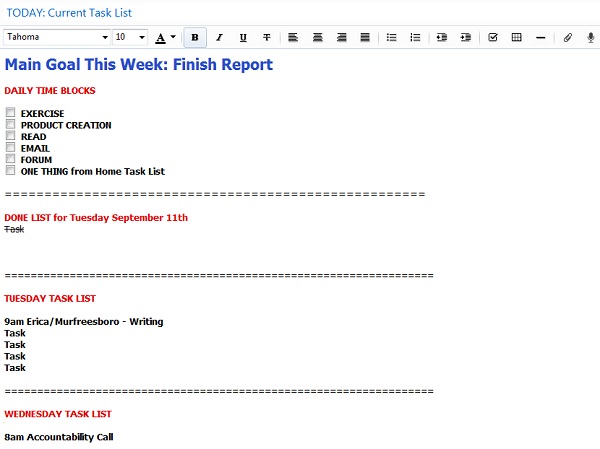
That's a blank version of course.  But I have my primary goal for the week in bold letters at the top (as a constant reminder) and then the checkboxes for my new Daily Time Blocks. These are things I aim to do every single day, and most of them have a specific amount of time attached to it. A minimum of 30 minutes of focused work on info products, one hour in the Inbox, 20 minute Time Block for reading, etc.
* If I spend more time on a particular goal, that's great - but I have minimums set, and use a timer to do the things on that list.
I intentionally set small time blocks for those items too, as a means of working them into my schedule without getting overwhelmed. Anyone can fit an hour or so a day in to do things they REALLY want to do...
The "DONE LIST" is where I move items from the Task List once they are completed. I also keep running notes there all day of anything I do, as a means of keeping track of how I spend (or waste) time. I have a running Time Log of how I've spent my time every single day going all the way back to mid-June.
The Time Log (or Done List) is particularly useful for looking at ways you can better spend your time, analyzing what's working and what isn't, and identifying repetitive tasks you should outsource.
The Task List is obvious. It's simply a list of tasks to be accomplished that day. The goal is to move everything from the Task List to the Done List, and also to mark off each of the time blocks. Then I move the Done List to another file (where I've been saving them all to review), uncheck the time blocks, and start all over again.
The "done list" file comes in handy! It's a great way to look back and easily see which day I transferred these funds or paid that bill, started a certain promotion, sent an invoice, updated a page that is now converting better, or whatever.
Personal Tasks vs Business Tasks
Recently I was watching "The Net" with Sandra Bullock (1995) and she was sitting on the beach with her laptop. The handsome guy asks her, "business or pleasure?" To which she replies: "Is there a difference?" LOL I loved that line.
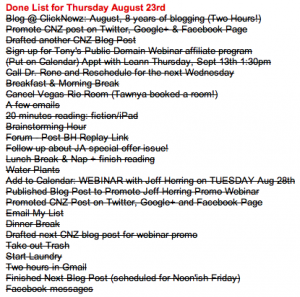 Everything goes on my Done List. Here's an example of a Done List pulled from my file (right). Some days are busier than others. Some days I work more than others, with some being more leisure days or spent doing personal tasks.
I'm monitoring how I spend my time to see how it could be better spent. And I'm working on overall life improvement and personal growth - which includes my business and personal goals.
So everything goes on the daily Done List, including things like: hour of email, write blog post, lunch, forum, nap, personal phone call with Susan, updated call to action on XYZ page, exercise, 30 minutes on product creation, etc.
I usually put the amount of time spent beside each item or task as well. That way I can see how long tasks are *really* taking me to complete, and calculate a more accurate ROI on certain projects.
Like I said, I'm looking for time wasters, what I could outsource, how I could manage my time better, what I should do more of - AND it holds me accountable all day.
A crappy done list is no fun!
So it's become a game or challenge that I "play" ever day.
That's how I have MY task lists set up in Evernote. I would love to hear how you have your task lists set up, whether in Evernote or elsewhere. It's so interesting how we all do things so differently, but I'm always looking for new ideas and love to hear how others are making it work!
Best,

On Friday I am tuning in to the E.S.C.A.P.E. Event online by Paul Evans and Carrie Wilkerson. Streamlining is absolutely critical if you want to take your business to the next level, or even if you just want to improve your quality of life.
Join us on Friday (or sign up to get the replay) if you want to improve productivity, increase your focus and - finally! - defeat overwhelm.
Click Here To Read Online, Comment or Share...


