I'm having tons of fun creating social media graphics!
Let me start by saying... I stink at graphics.  It is definitely NOT my strong suit. That being the case, I'm inclined to outsource creative graphics for my social media channels.
Why? Quality graphics, images & Infographics are great for "share bait"! They also get a much higher rate of engagement than other types of social media updates (such as text updates or links) across all platforms.
Outsourcing graphics is a great idea, but that can get REALLY expensive if you're putting out the amount of image content you really need to be across the web - consistently.
My solution: Graphic Templates!
Better yet, CHEAP Graphic Templates! 
And unlike outsourcing, it's a one time low-cost investment instead of an ongoing expense. I'll show you some live examples, and where you can get these graphics packages super cheap...
Note: You don't need expensive image editing software. You can edit PSD (Photoshop) files FREE at Pixlr.com, or you can download Adobe Photoshop CS2 for free.
You may remember the Infographics Templates I mentioned here on ClickNewz last year? Those are the templates I'm using to create a variety of web graphics.
Click Here To Check It Out
I bought the main package plus the "Infographics IM Edition PLUS" and "Marketing Graphics Pack" that were offered super cheap after my order.
You can see the details in this post. Like I mentioned in that post, these graphic templates can be used for practically anything - in any niche!
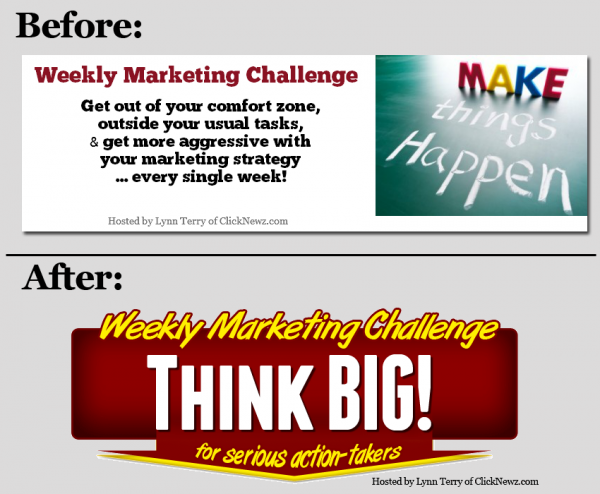
As one example, I used the templates to create a Facebook Group Cover Graphic. Here's the "before & after" - the first image was my quickie attempt on my own, and the second is a sharper / bolder image I created using the templates:
Since that was SO easy (literally, a matter of minutes) I decided to try my hand at an Infographic. I have to say... that was FUN! Again, I'm no designer. It's all template based. Here's a preview of the Infographic I created for my low carb blog:
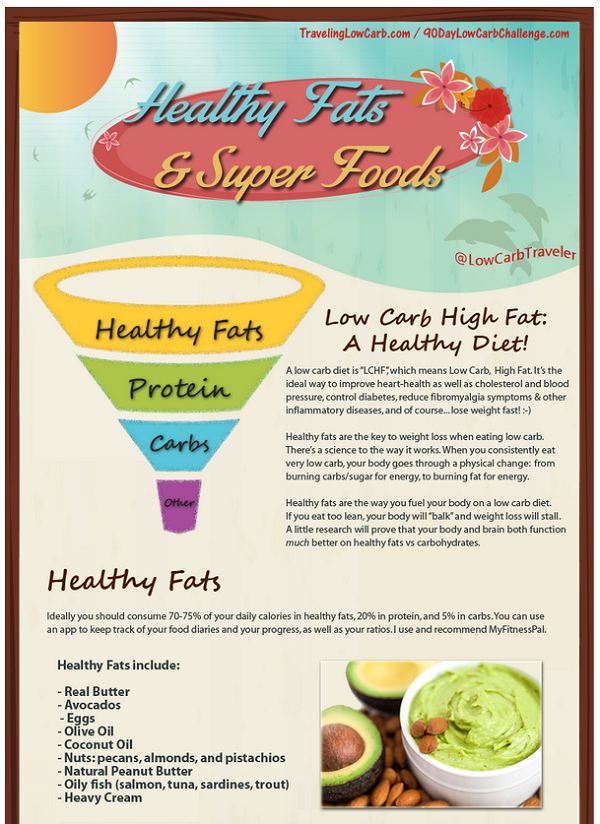
You can see it on my blog here. You'll notice I included instructions for sharing the Infographic, along with copy & paste HTML code to let people embed it on their blog or website. 
I agree that it's a little wordy. Don't judge me too harshly - it was my very first time creating my own Infographic. lol. Now that I actually created one though, I can't wait to go make another one! I've already generated a whole list of ideas for social media graphics, Infographics, and illustrations - most of which will be repurposed from popular blog posts & content in my archives (hint! TIP!).
Click Here to Get The Graphic Templates Cheap
You can create so much more than just Infographics. The package comes with tons of templates, images, layouts, etc. The options are endless! You can easily create illustrations for blog posts, share-bait for your social media channels, actual Infographics, and sales page & blog post graphics to increase conversions.
Check it out and have some fun with it!
Best,

p.s. The package is only $17 (not including the two add-ons I got, which are also super cheap). This is my referral link so thank you in advance if you decide to use these awesome templates! Note: Even if you don't want to do ANY editing, you can use all 10 of the Internet Marketing Infographics as-is (already created for you).
Here's my original post/review again.
Enjoy!
Click Here To Read Online, Comment or Share...