|
| 4 Steps To Grow Your Email List – Quickly |
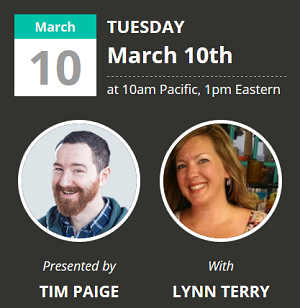 You'll want to join us LIVE on Tuesday for a FUN, FREE webinar on profitable list-building strategies! You'll want to join us LIVE on Tuesday for a FUN, FREE webinar on profitable list-building strategies! 
Topic: 4 Steps To Grow Your Email List Quickly (The Easy Way!)
Date: Tuesday, March 10th
Time: 1pm Eastern, 10am Pacific
Click Here To Register
Note: I'm not sure if there will be a replay. You'll want to register at the link above to receive the replay link if there is one available so you don't miss out. Try to join us live if you can!
Here's What You Can Expect To Learn:
- The 4 pages on your website that should receive the bulk of your attention, energy, and focus. (If you focus on these four webpages, you can ignore almost all the others and still increase profits). Pay attention to these four pages and you'll do great. Ignore them and you're hosed.
- The 7 most important tweaks you should make to your website in 2015.
- How to easily create a one-page dashboard to help you monitor the most important webpages in your business (and monitor the life of your list).

When you register, you'll receive two free downloads: the Rapid List Building Worksheet and the Rapid List Building Mindmap. And of course, you'll also get to join in on the FREE live visual training and get YOUR questions answered.
Click Here To Register
I'll see you there! 
Best,

p.s. I'm really excited about this event! If you want to learn how to convert visitors into subscribers - and create list building pages that convert like crazy! - you'll definitely want to join in live.
Click Here To Read Online, Comment or Share...
|
| Fast, Easy Landing Page Tips & Ideas |

As promised, here are my notes & ideas from the LeadPages training session we had earlier this week...
It was a seriously enlightening webinar, and I walked away with TONS of notes and creative ideas that I can implement immediately.
The webinar itself was super informative, with several eye-opening insights, but it also sparked specific ideas I can USE in my business - which I loved!
My biggest take-away from the session was this:
LeadPages + Imagination = Unlimited Possibilities!
I have tips from the actual webinar, plus my own ideas for using LeadPages, so I'll just share them with you (unedited) and we can continue to discuss it from there. I look forward to hearing your thoughts & ideas too! ...
Why I Invested In LeadPages
What I love about it, as a tool, is that it is the absolute easiest and fastest way to create professional looking high-converting landing pages and sales pages. It's not the only tool I own for this - I just discovered it's the BEST once I tried it out.
I'm glad I did too, because I'm a lot like you - I'm cautious about where I invest my time and money. There are SO many options and offers out there all day every day.
In fact, I was just having a conversation with Chris in my WMC group about how I waffled over buying the Super Affiliate Handbook all those years ago. 
That's actually comical in hindsight, considering how it dramatically changed my business - and my LIFE! But at the time, and let me just say it was my very first "ebook purchase", 50 bucks seemed like A LOT of money for an "ebook" (lol). This was at least a decade ago, mind you. (And you can actually get it for $27 now.)
Anyway, what was interesting about that experience was this... I finally decided to order it, but with one condition - I had to make my money back, using what I learned from it, within 30 days - period. Consider that for a second, because it's the BIG difference between an expense... and a smart investment.
LeadPages has the potential to pay for itself over and again, WAY beyond the cost of the platform and templates. And the best part is that you can literally start building a profitable list and making sales / earning money with it the same day you sign up!
* This is my referral link if you want to check out the features...
Download My Raw Notes & Landing Page Tips
In my usual "live example form" I made my notes & tips into a printable download you can get immediately via email using (drumroll, please!)... LeadPages.
This will give you firsthand experience with their LeadBox feature so you can see for yourself exactly how it works - and how you can easily use this feature.
Give it a whirl:
Click Here To Download
(if you can't see the button above, just click here)
How cool was that? Now go check your inbox and you should have an email there from me, along with a link to the file. Nice, right?
Here's what's GREAT about the LeadBox feature: Even if you were already subscribed to ClickNewz, LeadPages STILL sent you the download! Using an Aweber opt-in box instead, you would have received a notification that you were already subscribed to the list - and you would have been left out.
But using the LeadPages LeadBox instead, you can send the file directly - regardless. This serves ALL of your readers, whether they're already subscribed or not. And of course it subscribes those that weren't already on your list. Bingo!
I'll give you my notes & ideas here in this post too, but you can use the button above (or click here) to get the printable download version for quick reference. Go ahead and check out the download (it's pretty! lol) then keep reading...
Webinar Notes & Landing Page Tips
(Lynn's Notes)
1. Create a "Resource Guide" Landing Page
Free Report: 1 Page PDF
Give them "the tools the pros use" / simple tools
(this one page download outperforms ebooks & other offers!!)
Make it Easy/Quick/Simple - checklist, worksheet
* This makes list-building super easy! Don't over-think your opt-in incentive. Give them a ONE PAGE download, or quick actionable reference.
2. Always check the Mobile Version of your Landing Page
You can switch back and forth from mobile to web and preview both. Make sure your mobile version is appealing, given the majority of users in most niches are mobile or using tablets now.
3. Facebook Page Integration
Publish your landing page to Facebook - Easy & Awesome!
On your Facebook Page, go to Settings > Apps
> Edit button name & image
4. Use the LeadMagnet option to send a confirmation email with download link and/or attachment directly to your new subscriber, meaning: you don't have to go through the extra step to set it up as a follow-up in Aweber for them to receive it immediately.
5. Use the "Invite A Friend" thank you page template
Go to landing page you created, replace "default" link with the thank you page you create in LeadPages. This "Invite A Friend" template encourages your new subscribers to share your blog post or landing page link on Twitter and Facebook - increasing your reach, easily!
6. Use LeadBoxes (pop up opt-in links) for "Content Upgrades"
- specific leadbox for topical blog posts
- checklists
- printable version of page
- worksheets
- recipes
- resource guides
(This blog post serves as a "live example" of a "content upgrade"!)
7. Host Webinars To Increase Engagement & Sales
- Sort webinar landing page templates by conversion rate
(choose the template that converts best!)
- Include Facebook comments on the landing page
- Host a webinar every two weeks
- Simple Q&A webinars are EASY!
My Ideas - Ways To Use LeadPages In MY Business
As you know, I blog here at ClickNewz - but I also have a low carb blog and run a low carb challenge at 90DayLowCarbChallenge.com. So my ideas are for both niches, and hopefully these "raw notes" will give you some ideas on ways to serve YOUR market!
(Unedited) My Ideas:
Set up low carb challenge page on LeadPages
(I'm losing tons of potential subscribers on the current page!)
Share the before & after pages & results in a LeadPages Case Study
Host Q&A Webinars for both ClickNewz AND TLC
(alternate weeks & do one weekly)
* TLC = TravelingLowCarb.com
TEST: Do LeadBox Links work on Facebook?? (ie pop up a box to subscribe) (If so, mention/show this awesome tip in SMR & Facebook Groups NSB module!) THIS would be AMAZING for social media list-building if leadbox links work on Twitter, FB, etc!!!!
** (tested) HOLY SMOKES  OMG - IT WORKS! Do you have ANY idea what this means for SOCIAL LIST BUILDING?! ha Wow... the implications in my Facebook Group alone are blowing my mind... !!! OMG - IT WORKS! Do you have ANY idea what this means for SOCIAL LIST BUILDING?! ha Wow... the implications in my Facebook Group alone are blowing my mind... !!!
Set up a LeadPage for my Objectives Worksheet download
Create a follow-up series about how to use it, and use that to promote the SMR/NSB combo as a perk to my membership
Set up Landing Pages for single topical modules of NSB
(low cost offers to "preview" Niche Success Blueprint)
Set up a LeadPage & LeadBox for a printable version of my popular "blog post outline" and "product review outline". (easy freebies for list-building)
Set up a Landing Page for the checklists / task lists I created in the two NSB training modules. (low cost product, integrated into my JVzoo funnel so affiliates can promote it too!)
"Resource Guide" Brainstorming for TLC (freebies):
- Low Carb Food List
- Photo Food Journal (browse for visual meal/snack ideas!)
- Step by Step MFP setup (printable directions)
- The Top 5 SuperFoods You Should Be Eating Every Day
- Low Carb Picnic / Cookout Foods List
(seasonal hot topic, coming up soon!)
- Checklist to increase your weight loss on the low carb diet
Use LeadPages to promote affiliate programs. Ideas: download exclusive interview w/product creator, a resource guide for how to best implement the product/service, etc.
Brainstorming Affiliate Ideas:
- THESE NOTES to promote LeadPages (Done! -lol)
- My "product brainstorming ideas" to promote IPP & the training series
- WordTracker: Keyword Targeting Report & Webinar (free or low cost?)
- List of low carb products at Netrition (with links to recipes)
- Quest Bar Giveaway and/or Exclusive Interview with them
- Cookbook! A giveaway with Jimmy Moore for Keto Clarity?
- Q&A Webinar with Jimmy Moore, replay could be a good lead magnet!
(^ use this webinar to promote giveaway too)
More ideas...
Use LeadPages to do a $50 Amazon Gift Card Giveaway for Low Carb niche. Create a PDF list of products from Amazon & Netrition they can choose from (resource guide). They subscribe to get the free download and to be entered into the giveaway.
Create tons of free & low cost products on LeadPages
(repurpose everything I have!!)
Set up a FUNNEL on JVZoo for freebies to lead into paid products
(so affiliates can promote freebies & earn commission!)
Recruit Affiliates
(Finish my affiliate signup landing page)
Use LeadPages to do an NSB Giveaway
Use LeadPages to do an Elite Member giveaway (full year)
TOPICAL WEBINAR REPLAYS (in my archives) - Low cost or List Builders
As you can see, I'm brainstorming a VARIETY ways to use LeadPages:
- Live Webinars
- Free Downloads (Lead Magnets)
- Low Cost Products
- Creating Funnels w/Free & Low Cost Products
- Giveaways
- Recruiting Affiliates
- Promoting Affiliate Programs/Products
I'm really excited about recreating 90DayLowCarbChallenge.com using LeadPages.
The giveaways and webinars are easiest, so I'm going to start there. Along with my affiliate signup page, which is mostly done (with some easy revisions to wrap it up). Next I'll work on repurposing content into freebies - which is also easy.
My plan is obvious: to start with the EASY tasks... to get the fastest return on my investment in this amazing platform.

The LeadPages Bonus Offer
I also took notes on the bonus that was offered during the live webinar, but these are only available until Saturday March 14th at Midnight.
If you missed the webinar, and didn't register to get the replay, you'll have another opportunity to watch the replay next week. Make sure you're subscribed by email and I'll send you that link as soon as I get it...
Act Fast - Good through Saturday only!
There were 5 Bonuses offered to Attendees:
- Free Resource Guide (opt-in incentive) created for you!
- Landing Page Copy Course
- Webinar Course
- 5 Free Professional Landing Page Critiques
- The Presell Formula Course
You have to use this link to sign up to get the bonuses automatically: http://leadpages.net/lynn (you only get these five bonuses if you sign up for an annual plan - given you're getting hands on personal service (critiques, lead magnet / opt-in incentive created for you, etc).
When you listen in to the replay, Tim explains each of those five bonuses - which are really cool. The bonuses will only be available until Saturday. If you're already a member of LeadPages, you CAN upgrade to annual (or higher annual) to get the bonuses too.
What Others Had To Say...
It was a great webinar packed with lots of good information. My takeaways....
*the free tools/resource offer out performs free coaching sessions
*greater value does not equal a higher conversion rate
*Utilize your 'Thank You' page: use it as an opportunity to get a conversation going with your audience
*Have something that is relevant at the end of blog posts that people can get by opting in
Leadpages is a great tool but at this time it's not in my budget to make the purchase, but when I get some regular clients then I'll be able to do so.
If you're in the same boat ^ consider how you can get a FAST ROI (return on your investment) by USING LeadPages to get more clients or sales... FAST.
I attended the webinar for Leadpages today and was surprisingly blown away! There are so many things LP can do, and it looks so easy it's almost scarey... lol. My brain is on overload with ideas and applications for this thing. The conversion rates are amazing. Seems like that's due to the fact that this thing tracks and sorts your pages BY conversion rate so if you pay attention and tweak your pages accordingly, you can eventually work out the exact page that gets you the highest conversion rate for your site/opt-in/product/whatever. I love that...
Others called it highly motivating, extremely inspiring - and even "epic!"
I hope you enjoyed my notes, ideas and the live example. And even more than that, I hope it gave YOU some creative ideas for how to use Lead Pages (or any landing pages) in YOUR niche or business.
As you can see, I got A LOT out of the live training on Lead Pages, and aim to implement it straight away. So stay tuned for more fun live examples and case studies...
Download these notes & ideas to keep:
Click Here To Download
Best,
p.s. I would love to hear your thoughts. Be sure to leave a comment!
* For reference, this is my referral link for anyone wanting to check out the features: http://www.clicknewz.com/leadpages.htm
Click Here To Read Online, Comment or Share...
|
| Your Questions About The LeadBox… Answered |
 After my post with the landing page tips & ideas, I received several questions about it across the web - so I thought I would answer those here for everyone... After my post with the landing page tips & ideas, I received several questions about it across the web - so I thought I would answer those here for everyone...
That post serves as a live example that proves an obvious fact: If you can write a blog post, you can create a "lead magnet" (or write a report). Easily. **If you look at the free download, you'll see what I mean.
It's also a live example of one of the points in my notes about "a content upgrade". It's such a simple concept, but a brilliant way to build your email list... fast! I'm testing it in my other niche with GREAT results so far, by the way. Not to mention it's also a live visual case study of "smart affiliate marketing" for you to study.
But for now, on with the leadbox questions (and a BIG tip!!)...
You Sent The Download Link Before I Confirmed...
Most people noticed when they tested the LeadBox that it sent them the download link first, and the Aweber confirmation request email second. Meaning anyone could get the download without confirming their subscription to your mailing list.
This is what the LeadBox looked like - and you can click here to test it:
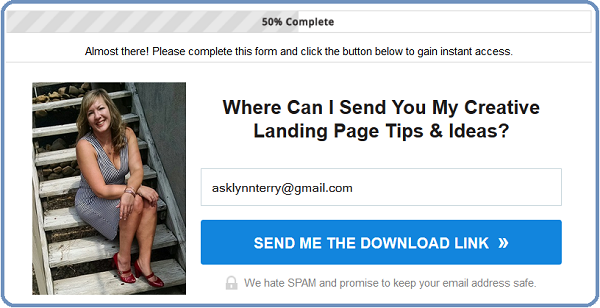
* I sent the download link first on purpose, as I mentioned in the original post.
I wanted people to be able to get the free printable notes - even if they were ALREADY subscribed to ClickNewz. If YOU were already a subscriber, you may have seen a message telling you that, but when you checked your inbox you STILL received the download link. Nice, don't you think?
Can You Change That Setting?
Yes! You have the option to simply use the setup of your mailing list manager alone, without the LeadPages features. That means you can set up your custom confirmation page, a custom success page (after they confirm), and use your own follow-up email series that you have set up in Aweber (or your mailing list manager).
You have plenty of options!
The additional options in the LeadPages features include the ability to set up high converting thank you pages (which you can still use in Aweber, by the way) and the ability to send an immediate email with the download or even just a note - whether they confirm or not. Which, as I mentioned, is really handy if your reader is already a regular subscriber but wants to get the cool download you're offering!
This gives you the option of creating awesome "Content Upgrades" on practically every post, or at least your most popular posts, without offending (or pissing off!) your loyal readers. Those "Content Upgrades" or download offers can be great for conversions too, so that's something to keep in mind...
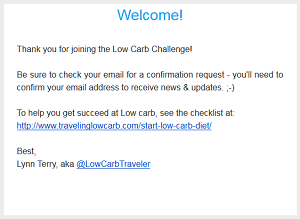 For the first Lead Box test for my low carb group, I didn't use a "lead magnet" (an opt-in incentive). I simply created a Lead Box to encourage them to get on the list for Official Challenge Updates. For the first Lead Box test for my low carb group, I didn't use a "lead magnet" (an opt-in incentive). I simply created a Lead Box to encourage them to get on the list for Official Challenge Updates.
They immediately get a message (sent via LeadPages - even if they were already subscribed, and just forgot) that tells them to check for the confirmation email.
This is a great place to give them another valuable link too, though...
In the example to the right I linked to a helpful checklist, but I might edit it to include a link to "Get This Week's Low Carb Coupons!"
Which Is The Ideal Setup For LeadBoxes?
It would be really rude if a regular reader, and a loyal subscriber, was reading one of your newest posts and clicked to get the cool new download you offered... only to be told "sorry you're already subscribed so you get left out!"
My advice: send the download immediately, and code in an incentive to confirm their subscription. Give them a teaser about what they're going to get when they do! You might have another cool download waiting for them on the confirmation page, for example.
TIP: Make your download something they WANT to open (right away). Include a teaser in the opening message like "wait until you see the tip on Page 3" or "You'll love these 7 tips - but I'll go ahead and tell you that #4 is one I'm using every day!"
Also make sure your download includes a call-to-action, so it's "working for you" even if they do not (for some crazy reason?!) confirm their subscription.
Getting them to open and read your download is key #1.
Getting them to take action after reading it is key #2.
You want everyone to have your download - even if they don't subscribe. But hopefully they'll love it, and confirm without hesitation. That's the goal, right? Especially if your download is "working" for you (ie affiliate link, call to action, etc).
Using LeadPages For Easy Social List Building
I'm currently testing Lead Boxes in social media updates, and so far my "social list building experiment" is going really well! I've seen a nice spike in subscribers the last couple of days, with the lead box currently converting at 49% - without even using a free download or incentive!
The implications of this feature for my facebook groups alone is HUGE.
The lead boxes are mobile friendly of course, which is important given the majority of users are accessing social media via smartphone or tablet. They're also simple, not overwhelming like a whole landing page. Just quick easy leadboxes - which you can use in Tweets, in Facebook Page updates, in Facebook Groups, etc.
I'll be posting a follow-up with live examples using the lead boxes for "social media list building" after I do more testing... so stay tuned for that!
Download my Landing Page Notes
for even more creative ideas here:
Click Here To Download
Best,
p.s. This is my referral link if you want to check out ALL of the cool features: http://www.clicknewz.com/leadpages.htm
Click Here To Read Online, Comment or Share...
|
| Another Exclusive Coupon Code For You! :-) |
I love negotiating exclusive deals for you. And this is a GOOD one!
This awesome deal is for one of my favorite training packages, on the topic of copywriting - and one I've recommended to everyone I know since I discovered it myself. It's simply a must-have if you're doing business online, in my opinion.
The package is the Sales Letter Writing Formula (our exclusive coupon code is: "lynnterryonly" - without quotes) by Richard G. Lewis. This is NOT just for writing awesome Sales Letters, although it's IDEAL for that. To be truly successful online, you really must nail copywriting. You'll use it in practically everything you do - email marketing, writing blog posts, even your social media updates!
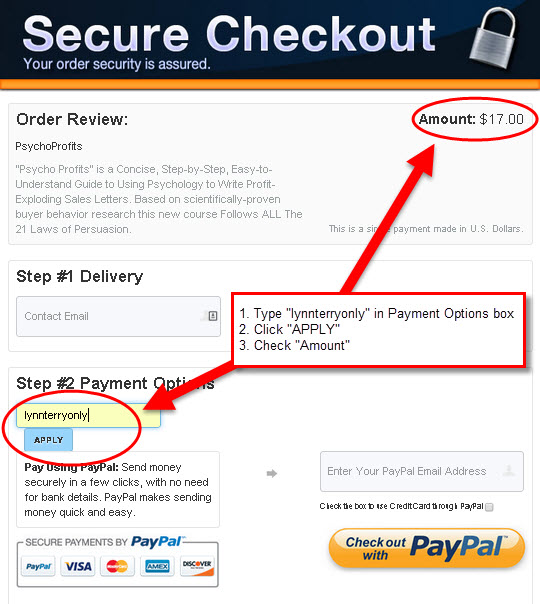
Step one: Check out Sales Letter Writing Formula (my referral link). You'll notice it's only $17, which is already a steal. Scroll down to the end and click "Buy Now". On the next page enter your exclusive coupon code lynnterryonly in the Payment Options box and click Apply. Your price will update to just $9.95. Confirm that before you checkout. That's all you have to do to get this exclusive discount!
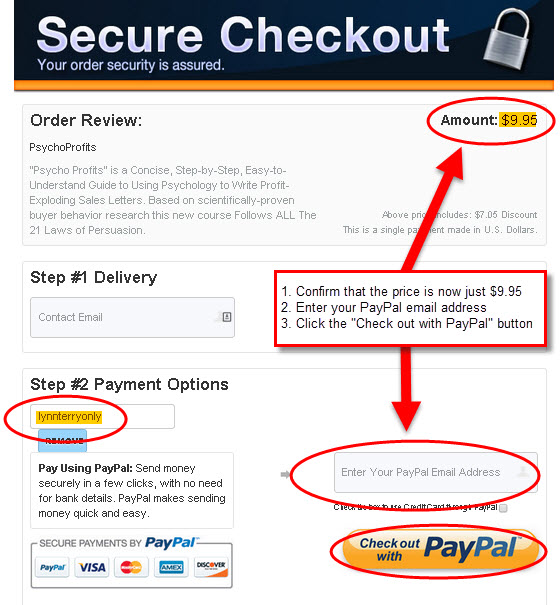
I'm not going to waste a lot of time telling you all the great reasons you should grab this package. You can read all about it on the Sales Letter Writing Formula page.
It's truly a no-brainer for less than 10 bucks. The bonuses alone are worth WAY more than that, like how to profit from color psychology for example.
Check it out, apply the code, enjoy the savings - and "convert on!"
Best,
p.s. You can read my original post here, but make sure you remember to use the coupon code "lynnterryonly" when you check out to get it for only $9.95 today!
Click Here To Read Online, Comment or Share...
|
| Why You Shouldn’t Ignore Twitter… |
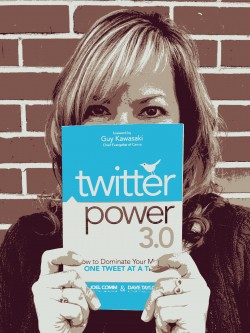 Why you shouldn't IGNORE TWITTER - hmm, a great title considering how far behind I am with my own Twitter accounts. lol. Why you shouldn't IGNORE TWITTER - hmm, a great title considering how far behind I am with my own Twitter accounts. lol.
(No worries, I'll catch up! I always do...)
This is a great topic for the week though, as Twitter Power 3.0 was just unleashed on the world today... and it's making a HUGE splash!
So let's talk about Twitter.
In more than 140 characters, even.
What I'm going to say might offend you, hurt your feelings, make you think I'm a social media SNOB -- or it might just enlighten you and make a few light bulbs go off in your mind. Or all of the above! LOL...
"I Hate Twitter"
I had an interesting discussion on Facebook yesterday with someone who said that. She said, "I hate Twitter." It's not the first time I've heard that, or heard it about Facebook or Instagram or Google+ even - or just Social Media in general.
Everyone has their preferences, right?
That's totally fine.
Love what you love, don't what you don't.
Who Cares?!
I'll tell you the answer: YOU. That's it. You're the only one that cares whether you like Twitter or not - or anything else for that matter.
The fact is, your target market could care less about your preferences.
They don't care which platforms you like or dislike.
They just know if you're there, and they don't know you if you're not! It's your job - your duty, your obligation (as a market leader or publisher) - to meet your market where they are, and where they like to talk and find cool content.
If you're not there, you're content is not there to share!
YOU... are the only person your preferences are affecting.
And not in a good way...
I personally don't enjoy Instagram or Pinterest. I have zero "pinterest" at all in either of those platforms. My low carb market is all over both of them though - so really, what choice did I have?! None, that's what. I had to suck it up.
Hang on - let's backtrack for a second...
How DO you know WHERE your target market is hanging out online? How can you find out where they're talking, and what they are saying?
Fortunately there's a free source for that. It's called Tagboard.
All you have to do is go to Tagboard and type in any one of your main key words. I am a low carb blogger, so I'll type in one of my most popular hashtags - lowcarb:
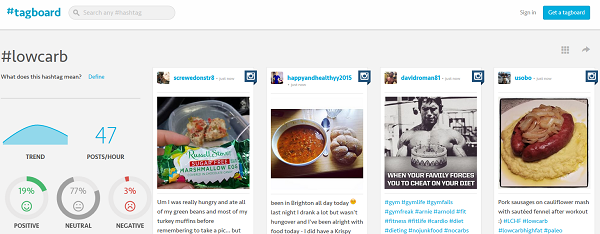
A quick look at Tagboard shows you that my market LOVES Instagram. It's where they are. Why in the world was I not there?! Because I didn't like Instagram.
Well that's stupid.
So what did I do? I hired a savvy young lady (that actually LIKES Instagram) to set up my accounts, and I paid her to "be me". (That's called outsourcing.)
I now maintain those accounts myself. It was worth every penny to get them kick started, though - because people don't leave their favorite platforms. They won't come to you... until they know you.
Does this mean I should ignore all other social platforms and focus strictly on Instagram and Pinterest? NO. It just made me realize that by giving in to my own preferences (my own dislikes), that I was missing out on a HUGE opportunity...
Twitter's Second Boom
Like it or not, Twitter is in a second boom, many thanks to mainstream media. You can't watch CNN without seeing a tweet or a hashtag. You can't watch a favorite show or sporting event without seeing hashtags on the screen.
The general public is tweeting, and reading tweets, and retweeting. They're already there, and primed by mainstream media. All you have to do is show up and jump in.
Consider that for a moment. How can you use that to your advantage? What shows is your target market watching on television? What media are they interacting with live, and what hashtags are they using to do it? How can you LEVERAGE that? Meaning: join the conversation, increase your exposure (not spam the discussion, lol).
Tip: Make a list of channels and shows relevant to your niche and research the hashtags and live discussions. Brainstorm ways to become "part of the conversation" in your niche! Again, the mainstream media is doing all the work for you. They are priming your market. All you have to do is SHOW UP.
"I find Twitter frustrating, and limiting!"
This is another common argument or dislike when it comes to using Twitter. I mean, how much can you really say in a Tweet?! A lot, actually...
Those limitations can really work in your favor. It allows you to be more meaningful in less words. It teaches you "quick copywriting" skills - which come in handy in other areas of your career - quick meets, elevator speeches, phone calls, etc.
Learning to "matter" in 140 characters or less is a cool thing.
Sometimes less is definitely more. Twitter teaches you how to edit yourself down to the message that matters most. How can you make the biggest impact in the fewest words? It's no different than meeting someone in line at Starbucks, getting a quick introduction to a big influencer, etc.
Learning to make BIG statements in a short sentence or two... is GOLD.
Twitter Power 3.0
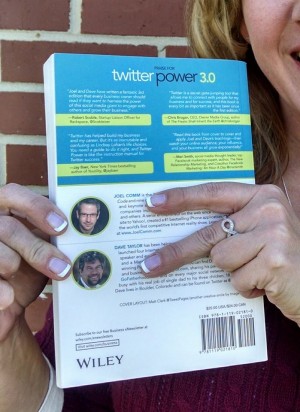 Today marks the official release of the brand new Twitter Power 3.0 book by Joel Comm and Dave Taylor. Today marks the official release of the brand new Twitter Power 3.0 book by Joel Comm and Dave Taylor.
These two men aren't just brilliant, and both men that I consider personal friends, they are also two people who have TONS of experience building an audience online and marketing on the internet - successfully.
You may know one or both of them as "internet marketers", but their experience goes way beyond that...
Dave Taylor has the #1 attachment parenting blog on the internet. Joel Comm started WorldVillage.com back in the early 90's.
Dave and Joel both still actively work in their niches.
With the launch of Twitter Power 3.0 you can not only learn "how to dominate your market one tweet at a time", you can also get cool bonuses for grabbing this book - if you get it this week during the big launch.
One of the bonuses for getting this brand new book on Amazon is a professional Twitter Profile Design - a $97 value! NICE. You'll also get a guide on mastering LinkedIn - and more. I got a free review copy of Twitter Power 3.0, but I'm buying my own copy today... just for the awesome bonuses!
Go to: http://www.TwitterPower.com to learn more about it.
... and then spread the word. *cheers*
I think I've made the point on why you shouldn't ignore Twitter, like it or not. Or any other social platform for that matter. So if you're going to get out there and expand your business across the web - you might as well learn how to do it right.
Next, see: Why You Should Be A Social Media SNOB...
Best,
p.s. I would love to hear your thoughts on Twitter. Love it? Hate it? What is YOUR experience with Twitter? Leave a comment below - including any questions you have on how to best leverage Twitter for your business!
Click Here To Read Online, Comment or Share...
|
| Why You Should Be A Social Media SNOB |
 If you know me at all, you know "snob" is not a word I would be associated with. Or not often, anyway. Every now and then someone mistakes my introverted personality for something other than "omg, get me out of this crowd before I implode!!" -lol. If you know me at all, you know "snob" is not a word I would be associated with. Or not often, anyway. Every now and then someone mistakes my introverted personality for something other than "omg, get me out of this crowd before I implode!!" -lol.
It's true that I'm a classic introvert. I'm not shy (anymore), but the true definition is someone that gets drained by a crowd. An extrovert gets energized by a crowd. An introvert is happiest in their own little space - and they don't know the meaning of the word "bored".
Why does this matter? Because you can learn A LOT from introverts, such as how to become more efficient and effective on Social Media for one.
That's what we're going to talk about today - how to use Social Media more efficiently, or why you should be a Social Media Snob, and what that means...
The Social Media Time Suck
As an introvert, I miss the pre-social days of the web when I could happily sit in a corner and focus on SEO and email marketing - without ever really showing my face or sharing my daily life. Not just because I'm an introvert (which is why I love working from home!), but also because social media sucks up so much extra TIME.
Not that I'm really complaining, because Social Media also has tons of benefits! It makes it easier than ever to get massive exposure, launch something cool, connect with brands and market leaders, and generally get seen and get clicks.
I'm sure you can relate.
It can be VERY time-consuming, but you know it's worth it.
So how do you fit it in, and do it RIGHT?
I'll share a few tips with you that really work well for me...
Don't Read Your Content Stream (Seriously)
As an introvert, the content stream on any social platform sends me in a spin and makes me spaz into a full-on anxiety attack. DO NOT click the Home button! Ever. It's pure madness, lol.
That may sound silly considering you've followed certain people for a reason, that reason being: you want to see their updates. Right? Hopefully (see the next tip!).
The only time I scroll through the content stream is in my downtime - when I'm standing in line somewhere, enjoying a coffee on the back deck at the end of the day, or otherwise not working. The content stream should be for mindless downtime only, like television.
There are more efficient ways to get good content, or to find out what your favorite people are up to today. On Twitter you can set up a Twitter List, or several - one for business content, one for specific topics or discussions, one for brands or market leaders you're following, etc. You can set up lists on Facebook too, but I find it easier to click "Get Notifications" on the people or Pages I want to make sure I get updates from. I don't want to miss a single thing my sweet daughter posts for example, or I might want to see every update for the Collision Conference I'm attending in May.
To give you an example, I have a public list on Twitter for "Brands I Love". You can make lists private, but in this case I wanted them to know that I love them (which is a great way to get in front of them):

Outside of lists and notifications, I use the search boxes frequently to find things, people or topics, which is much more efficient than scrolling through a noisy content stream! Tagboard.com is also a great resource for finding conversations or topics across multiple platforms - all in one nice, neat place.
Reciprocation Is Not Polite - It's Stupid
I don't know where the reciprocation idea originated, but it's just plain stupid! Just because someone follows you on Twitter doesn't mean you should follow them back. That may sound rude, or snobbish, but it actually makes perfect sense.
Your content stream should be unique to YOU. As should mine to me. Let's say that a worm farmer follows me because they eat low carb, or they follow my @LynnTerry account to get tips for marketing their worm farming business online. Why in the HELL would I follow them back if I have ZERO interest in worms?! I wouldn't. Duh.
You follow who you want to follow, subscribe to the content you want to receive, and let everyone else do the same. Period. It's that simple.
Sure, every now and then I get some weirdo who yells at me, "Hey, I follow you but you don't follow me back!" And I think to myself .oO Err, thanks for confirming why I don't.
There are programs that will let you go in and automatically unfollow everyone who doesn't follow you back. That's stupid too. What if you're following CNN to get news updates. Why in the world should they follow YOU? One has nothing to do with the other. Follow/Friend who you want to hear from. That's all.
Market Like An Introvert...
I'm not going to say introverts are smarter, but they ARE more efficient with their time. Especially their social time. I have a saying that goes:
"I'm in and out of Twitter quicker than a public restroom!"
It's true. It'd be the case with Facebook too if I didn't run a ridiculously massive super active Facebook Group. That one requires a bit more of my time! Anyway, the point I wanted to make is this:
Know what you want to do, get it done, and get out.
That requires having an objective of course, which is just smart marketing. Without a solid objective you're likely to be sitting around reading your content stream and following everyone back that follows you. Don't do stupid stuff. Log on to your social platforms with a purpose, and get your business done - effectively!
Let's say I want to go follow some smart new people on Twitter to increase my network of cool entrepreneurs. I just participated in a fun "book buzz" for the new Twitter Power 3.0 Launch, so I can go to Twitter and search twitterpower to find other people using the hashtag and talking about the book. Bingo! These are the perfect people for me to connect to, and given I'm talking about the book on my profile... they may just follow me back based on our similar interest.
Efficient, effective... and fast. That's my goal!
I hope these tips help you waste less time and get more done.
Thoughts, questions? Leave a comment & let's talk...
Best,
p.s. I teach my super efficient, highly effective "introvert methods" in a course called Social Marketing Results. You can get full access to SMR (PLUS hands on help from me with your business) when you become a member of my Private Brainstorming Group. You'll also get complimentary access to my $199 Niche Success Blueprint course, which is totally awesome.
You should join us today. It's a GREAT group, and I can help you take your business to maximum profit potential this year - in the quickest way and the fewest steps possible. Because that's what I do! *cheers*
- Oh, and right now you can join for only $37/month. The monthly option is rarely open, so you should definitely take advantage of that before it closes again.
Click Here To Read Online, Comment or Share...
|
|